

Ease of use
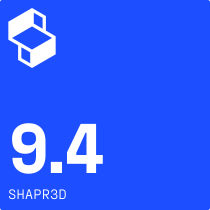
Shapr3D is consistently praised on review sites like G2 for being easy to learn and use, even if you don’t have CAD experience.
Source: G2 ratings

Which CAD tool is best for you?
| Shapr3D | Autodesk Fusion 360 | |
|---|---|---|
| Best for | Fast concepting, cross-platform workflows between iPad and desktop, immersive XR collaboration, onsite manufacturing operations, individuals new to CAD | Integrated CAD/CAM/CAE with strong manufacturing toolpaths for desk-based engineering |
| Platforms | Windows, Mac, iPad, Vision Pro | Windows, Mac |
| Modeling approach | Hybrid direct modeling and history-based parametric modeling | Parametric, direct, T-splines, generative |
| Collaboration | Versioning, comments, browser-based review links | Cloud-based sharing and versioning |
| Cloud/on-prem | Local compute; cloud sync (offline access available) | Hybrid cloud with local caching |
| PDM | Cloud PDM included | Cloud PDM included |
| Rendering | Real-time visualization | Integrated rendering tools |
| XR/AR support | Native Vision Pro multi-user XR editing; integrated AR review on iPad | Plugins and other software required; export to .usdz |
| CAM integration | Export STEP, STL, IGES, DXF, 3MF, XT, SVG, and other file types | Fully integrated CAD/CAM toolpaths |
Quick concepting and simple parts
| Shapr3D | Autodesk Fusion 360 | |
|---|---|---|
| iPad modeling workflow | Yes, optimized for iPad | No, iPad app is primarily for viewing |
| Apple Pencil compatibility | Yes, compatible | Not compatible |
| Push-pull modeling | Yes, available | Yes, available |
| UX/UI | Adaptive user interface surfaces tools needed in the next step for faster modeling | Radial menu provides context for next steps |
| Launch time | App and files open in seconds | Cloud-based architecture can cause a wait time when launching |
Mobile CAD
| Shapr3D | Autodesk Fusion 360 | |
|---|---|---|
| iPad functionality | Full modeling functionality, editing, review | Primarily viewing and annotation, limited modeling |
| Multidevice workflow | Yes, make edits between iPad, Windows, Mac | Edits only possible on Windows or Mac (not iPad) |
| Offline capabilities | Yes, all files available offline | Viewing and annotation of open/cached files only |
How do the pricing models of Shapr3D and Fusion 360 compare?
| Shapr3D Basic | Autodesk Fusion Personal | Shapr3D Pro | Autodesk Fusion | |
|---|---|---|---|---|
| Pricing | Free | Free | $25/month (billed annually at $299) | $57/month (billed annually at $680) |
| Capabilities/ limitations |
|
|
|
|
| Best for | Testing Shapr3D’s capabilities; designs that don’t need to be exported | Hobbyist makers not looking to profit off their creations | Hobbyists; solopreneurs; small shops; design and manufacturing teams within larger companies | Small to midsize manufacturing businesses; design and manufacturing teams within larger companies |
